After many requests from you guys, here we have the latest version of YouTube Pro APK. Yes, this is the modded version of the official YT app which gives you the all premium options for free.
Imagine, you want to watch a podcast or a long video of your favorite creator but you don’t want to see those long ads every two minutes. And, you cant afford to buy the YT Premium too. That’s why people are using this YT Pro APK. It is free and it just works.
I have tested this latest v60.0 update on my Realme P4 running Android 16. The app is doing its job perfectly by hiding ads and adding background play with smooth playback. One problem i was bothered about is the limit of 360p playback. I had to change to one settings to fix that problem. I have discussed that below.
So, This new update is very stable. The fresh base update of YouTube Pro keeps your YT experience fully premium without any ads.
What is YouTube Pro APK?
The YouTube Pro APK is a modified app of the official YouTube app by SamMods. By giving all premium options for free, this app can be the perfect app for you if you can’t afford YT Premium subscription. And another best part is that you can install it without uninstalling the official YT app.
It is really one of the best YouTube mods you can find in 2026. If you had ever used or still using, Vanced, ReVanced, or YouTube Blue before, you will like this one for sure. It blocks all homepage banner ads, lets us play videos in the background and also does play restricted videos without a VPN. That’s why, its one of my favorite apps on my phone.
Anyways, before downloading it, lets see all of its key features.
Features
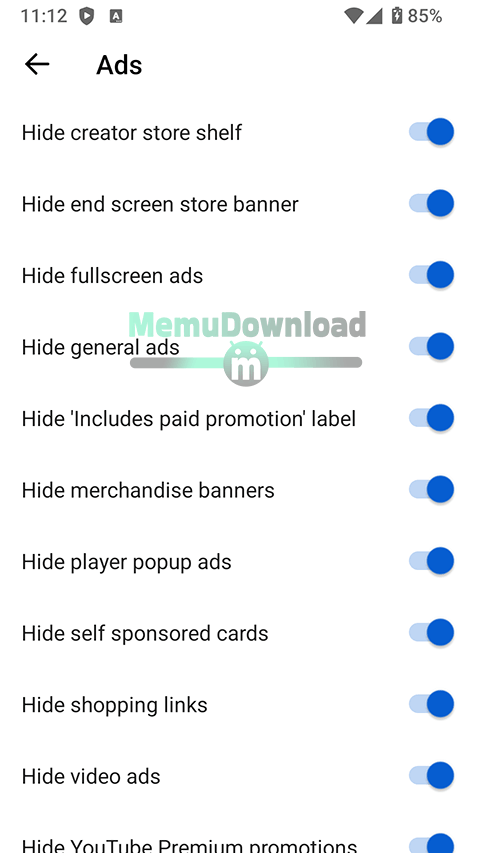
- No YT video ads or banner ads.
- Background Play & PiP.
- Direct Downloads: choose from 144p up to 4K.
- Unlocked swipe controls.
- Sponsor block automatically skips the talking parts of any sponsors by the creator.
- This app also has option to turn on “Return YouTube Dislike” database. So, you can see Dislike numbers of video.
- Custom settings: force HDR mode, turn off 60fps.
Steps to Install YT Pro (Premium) & MicroG
- First, download both MicroG APK and YouTube Pro v60.0 APK files from our download page.
- First, install MicroG, open it and tap Add Google Account. Then, sign-in with your Gmail details.
- Now, install the YT Pro v60 APK by Sam Mods.
- That’s it. Open the app, choose account and enjoy all of YT Premium for free.
How to Fix Common Issues of this app?
1. Fix Video Buffering
If any video keeps loading, lags or gets stuck while playing, do the following steps to fix it.
- Go to Settings >> Tap on YouTube Pro Settings.
- Then, go to “Miscellaneous”.
- Turn on “Spoof video streams”.
- Now, tap “Default client” and choose “Android Studio”.
- Close and restart the app. The buffering should be 100% fixed.
2. Fix the 360p Quality Limit
If you cannot select higher quality than 360p, then change the following setting.
- Go to app’s Settings >> YouTube Pro Settings.
- Tap “Miscellaneous” and go to “Spoof video streams”.
- Tap on “Default Client” and select “Vision OS”.
- Restart the app. Now, your problem should be fixed and you will be able to choose any quality (720p, 1080p or 4K).
These were the common problems which you can fix easily. Anyways, I absolutely loving using this app after the new YouTube Pro v60 update.
The experience of watching YT videos without ads and that too without paying for subscription, that’s great. The app is now feels lighter and faster with more settings to customize the experience of this app by Sam Mods. But, remember to download this app’s next update only from trusted websites like MemuDownload so you don’t download malware.
We upload its every version as soon as the developer sends the file. So, come back in a few days.